

AESTHETIC-PRESS
EFFICIENCY THROUGH SIMPLICITY
Get Instant Answers to Your Dental Laboratory Questions — 24/7
Powered by the expertise of MDT Jörg Müller.
Get instant answers to
√ technical questions
√ troubleshooting support
√ workflow guidance
√ material recommendations
√ years of real-world dental laboratory
experience
— all in one place.
Available 24/7, in all languages
and designed to help technicians
work smarter, faster,
and with greater confidence.
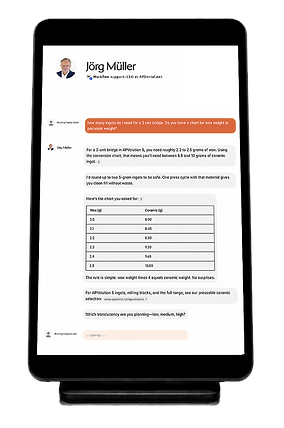


What can Jörg's Digital Mind -
Your Digital MDT Do?
√ Troubleshooting
√ Material recommendations
√ Pressing parameters
√ Layering guidance
√ Workflow optimization
√ Product information
√ Technical support
√ Help navigate the AP Dental website

Trusted by Dental Professionals
Real feedback from technicians using Jörg's Digital Mind
to solve problems, improve workflows, and save time.


Use Jörg's Digital Mind Like an App on Your Smartphone
Jörg's Digital Mind can be added to your smartphone's home screen in just a few seconds—no download or app store installation required.
It's completely free to use
with no subscription fees or hidden costs.
Simply copy this link www.delphi.ai/jorg-muller and follow these steps:
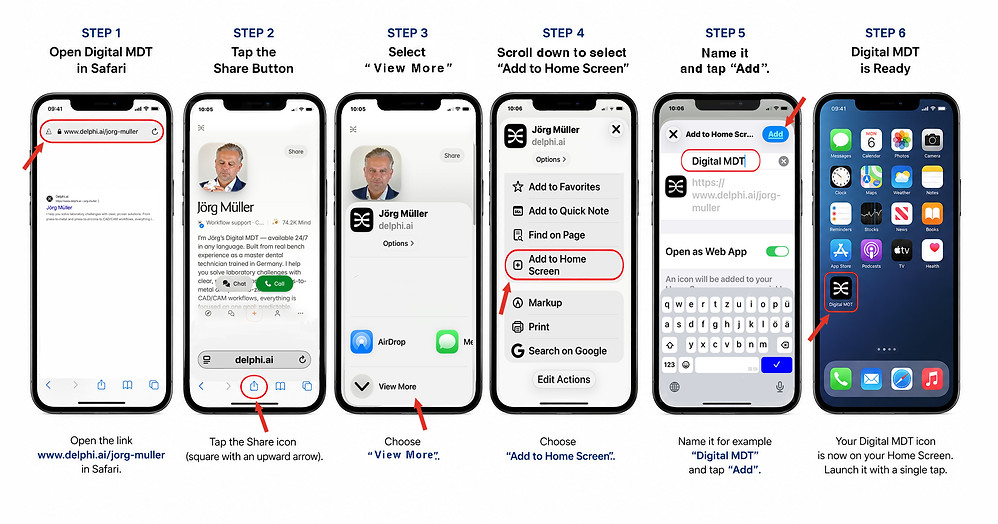
That's it!
Your Digital MDT will now appear as an icon on your home screen and can be launched with a single tap.
For Android (Chrome)
-
Open the Digital MDT link www.delphi.ai/jorg-muller in Chrome.
-
Tap the three dots in the top-right corner.
-
Select "Add to Home Screen" or "Install App" (depending on your device).
-
Confirm your selection.
Your Digital MDT will now appear as an icon on your home screen and can be launched with a single tap.

Looking for More Information?
For personalized assistance, product inquiries, or consultation requests,
our team is happy to help.
Contact us or visit our website.